
Boost ChatGPT with 200+ Combinable Prompts
Overview
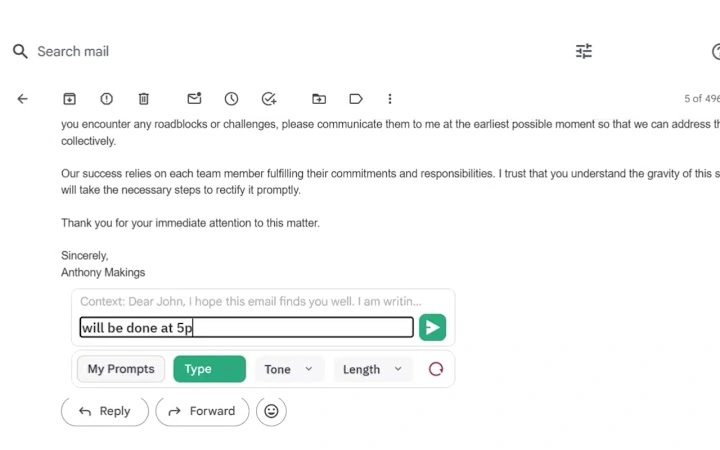
Ultimate Toolbar GPT is a desktop-enhancing browser extension designed to amplify the capabilities of ChatGPT through advanced prompt management and real-time input tools. It targets professionals, students, content creators, and anyone seeking to streamline their workflow with AI-powered writing assistance. The software integrates directly into the browser environment, offering immediate access to a library of over 200 combinable prompts tailored for different tones, lengths, purposes, and formats—including Excel integration.
This allows users to generate high-quality content more efficiently, whether drafting emails, reports, or creative copy. The tool also supports voice input, enabling users to speak their ideas directly into ChatGPT, which is particularly beneficial for those who prefer verbal ideation over typing. Additionally, outputs can be exported in Word and PDF formats, facilitating easy sharing and collaboration.
While the developer did not provide additional system requirements, the extension is compatible with both Windows and Mac platforms. Its lightweight design—only 2.4 MB—suggests minimal impact on system performance. The software is offered free of charge, making it accessible to a broad audience seeking enhanced AI productivity tools.
Key Features & Capabilities
- Prompt Builder with 200+ Combinable Templates – Offers a vast library of customizable prompts categorized by tone, length, purpose, and format, allowing users to mix and match elements to create precise AI instructions. Ideal for generating consistent, tailored content across multiple projects.
- Voice Prompt Input – Enables real-time voice-to-text input, letting users speak their ideas directly into ChatGPT. This feature supports hands-free operation and is especially useful during brainstorming sessions or for users with typing limitations.
- One-Click Export to Word and PDF – Allows seamless export of generated content to standard document formats, simplifying the process of sharing, archiving, or presenting work without manual formatting.
- Integration with ChatGPT via Browser – Functions as a companion tool within the browser environment, enhancing ChatGPT’s native interface without requiring complex setup or additional software installations.
- Privacy-First Design – Does not collect, store, or track user inputs. Only email addresses are collected during sign-up for updates and newsletters, ensuring user data remains secure and private.
These features collectively improve workflow efficiency by reducing the time spent crafting prompts and formatting outputs. For example, a student can use a pre-built prompt for a research summary, speak their key points via voice input, and export the result as a PDF for submission. A marketer could combine tone and purpose filters to generate social media copy with a specific brand voice. The tool’s modular design supports rapid iteration and experimentation, making it adaptable to diverse use cases.
User Interface, Workflow & Performance
The user interface is designed for simplicity and direct access, integrating seamlessly into the browser’s toolbar. Navigation is intuitive, with clearly labeled buttons for prompt selection, voice input activation, and export functions. The workflow follows a linear path: choose a prompt template, input or speak your request, generate content, then export.
This streamlined process minimizes friction and supports rapid content creation. The developer did not specify resource usage details, but the 2.4 MB file size suggests low memory and CPU overhead. Performance observations are based on general software behavior patterns.
The extension operates in real-time, with minimal lag during prompt generation and export processes. Stability appears consistent, as no reports of crashes or errors were mentioned. The absence of background processes or data collection enhances overall system responsiveness.
Users can expect smooth operation across both Windows and Mac environments, though exact performance benchmarks were not provided.
Compatibility & System Requirements
Ultimate Toolbar GPT is compatible with Windows and Mac operating systems, supporting both desktop environments. The software version is 1.0, with a file size of 2.4 MB. It functions as a Chrome browser extension, meaning it requires Google Chrome to operate.
The developer did not specify exact system requirements, such as minimum RAM, processor speed, or disk space. Compatibility information was partially provided, with no mention of older OS versions or non-Chrome browsers. Users should ensure their system meets standard Chrome browser requirements to run the extension properly.
The lightweight nature of the software suggests it will function on most modern machines, but specific hardware demands were not disclosed. No additional dependencies or third-party tools are required for installation or operation.
Pros and Cons
Pros
- Over 200 combinable prompts for precise content generation
- Voice input support for hands-free operation
- One-click export to Word and PDF formats
- Lightweight design (2.4 MB) with minimal system impact
- Privacy-focused—no tracking or storage of user inputs
- Free to download and use
Cons
- Only available as a Chrome extension—no native desktop app
- Compatibility limited to Chrome browser
- Exact system requirements not disclosed
- No offline functionality mentioned
- Dependent on external ChatGPT service for core functionality
FAQ Section
Is Ultimate Toolbar GPT compatible with Mac and Windows?
Yes, the extension is compatible with both Windows and Mac operating systems, provided they support Google Chrome.
Can I use this tool without an internet connection?
The software requires an active internet connection to communicate with ChatGPT. It does not support offline usage.
Is my input data stored or tracked?
No, the extension does not read, track, or store any user input. Only email addresses are collected during sign-up for newsletters and updates.
How often are updates released?
Updates are released periodically to improve functionality and compatibility. Users are notified when new versions are available.
What license type does this software use?
Ultimate Toolbar GPT is free to use with no licensing fees. It is distributed under a free-to-use model with no trial period.
Final Thoughts
Ultimate Toolbar GPT delivers a focused, efficient enhancement to the ChatGPT experience through its rich prompt library, voice input, and export capabilities. Its lightweight design and privacy-first approach make it a compelling choice for users seeking to boost productivity without compromising security. While it is limited to Chrome and requires an active internet connection, its core features address real-world needs for faster, more accurate content generation.
Professionals, students, and creatives who rely on AI writing tools will benefit most from its modular prompt system and seamless export workflow. The fact that it’s completely free adds significant value. For those looking to maximize their ChatGPT output with minimal friction, this tool offers a powerful solution.
Download Ultimate Toolbar GPT now to unlock the full potential of your AI-powered writing.







